Welcome!

By registering with us, you'll be able to discuss, share and private message with other members of our community.

Sign up now!
RuneMate will permanently shut down on August 7, 2026
due to events outside our control. You can continue using RuneMate until this date after which it will no longer be available. Thank you to everyone that contributed to RuneMate's success and to the community for the opportunity to serve you all these years.

  • Learn about RuneMate Vault and how its zero knowledge local encryption already protects your sensitive information.
  • Edit or delete your RuneMate account from your Account Settings.
  • All account upgrade subscriptions have been cancelled. No action required.

Resolved Client Problem

Joined
Aug 31, 2015
Messages
18
Hello, I have a problem about bot closing when i start running a game in fullscreen for example mad max.
When i run a game all the bots suddenly close. Does anyone have a same problem ?

Here are my PC specification:

Graphic Card: Geforce GTX 970
Processor: Intel(R) Core i7-4790 CPU 3.60Ghz
RAM:16Gb
Resolution: 1920x 1080 60Hz
Windows: Windows 8.1

Thanks for help.
 
Ex-Staff
Joined
Apr 19, 2015
Messages
537
Did you minimize the bots before launching the game ?
Did you get any error messages ?
 
Joined
Feb 27, 2015
Messages
577
Hello, I have a problem about bot closing when i start running a game in fullscreen for example mad max.
When i run a game all the bots suddenly close. Does anyone have a same problem ?

Here are my PC specification:

Graphic Card: Geforce GTX 970
Processor: Intel(R) Core i7-4790 CPU 3.60Ghz
RAM:16Gb
Resolution: 1920x 1080 60Hz
Windows: Windows 8.1

Thanks for help.

That's java crashing. It literally ALWAYS does that for me if I launch a game in fullscreen. All you have to do is go in the graphics option of any game you're playing, and pick fullscreen windowed, or borderless windowed instead of straight fullscreen and that will fix your problem. If there's not an option for that, there's a program I used to use, think it was called force borderless windowed or something. Little hungover atm, but a bit of googling should find it if you can't :D Happy botting/playing
 
Ex-Staff
Joined
Apr 19, 2015
Messages
537
Hello, I have a problem about bot closing when i start running a game in fullscreen for example mad max.
When i run a game all the bots suddenly close. Does anyone have a same problem ?

Here are my PC specification:

Graphic Card: Geforce GTX 970
Processor: Intel(R) Core i7-4790 CPU 3.60Ghz
RAM:16Gb
Resolution: 1920x 1080 60Hz
Windows: Windows 8.1

Thanks for help.

That's java crashing. It literally ALWAYS does that for me if I launch a game in fullscreen. All you have to do is go in the graphics option of any game you're playing, and pick fullscreen windowed, or borderless windowed instead of straight fullscreen and that will fix your problem. If there's not an option for that, there's a program I used to use, think it was called force borderless windowed or something. Little hungover atm, but a bit of googling should find it if you can't :D Happy botting/playing
http://westechsolutions.net/sites/WindowedBorderlessGaming/
 
Joined
Aug 31, 2015
Messages
18
It's not minimizing the bots, going right into full screen is making your clients crash.
Try the borderless gaming options as linked by Microsoft. :p
mmm I think u missreaded, check it again. Yes i know for/about borderless window :)
 
Ex-Staff
Joined
Apr 19, 2015
Messages
537
mmm I think u missreaded, check it again. Yes i know for/about borderless window :)
Don't start RuneMate yet.
Firstly launch your game in Windowed Mode by either changing it's settings, or by using the tool I provided.
After this, you should be able to open up RuneMate and minimize them ;)
 
UPDATE: To change the game settings I found this..

If your using Steam to play the game:
https://steamcommunity.com/app/234140/discussions/0/527273983048697453/#c527273983050827557

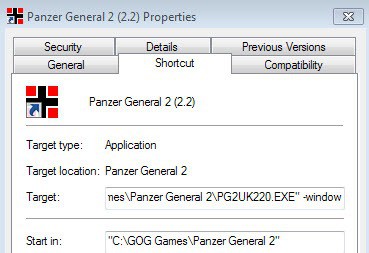
If it's a standalone installation then add -windowed to the shortcut destination.
In example:
window-shortcut.jpg
 
Joined
Aug 31, 2015
Messages
18
Don't start RuneMate yet.
Firstly launch your game in Windowed Mode by either changing it's settings, or by using the tool I provided.
After this, you should be able to open up RuneMate and minimize them ;)
 
UPDATE: To change the game settings I found this..

If your using Steam to play the game:
https://steamcommunity.com/app/234140/discussions/0/527273983048697453/

If it's a standalone installation then add -windowed to the shortcut destination
Ye i figured that thanks anway :) i though that there is any other thing thanks for a help and response :)
 
Ex-Staff
Joined
Apr 19, 2015
Messages
537
So you managed to resolve it now :p ?
PS: I added another fix when your not using Steam [check my above message]
 
Top